
Sitting-Duc
-
Posts
5358 -
Joined
-
Last visited
-
Days Won
29 -
Donations
91.99 USD -
Points
16,555 [ Donate ]
Content Type
Profiles
Forums
Gallery
Twitch
Running Commentary
Events
Store
Downloads
Everything posted by Sitting-Duc
-
I am aware of similar issues in the past, and vaguely recall when signatures had problems which was (I thought) resolved. I guess I am at a loss as without being able to reproduce it I can do nothing easily.. reproducing it means log verbosity can be changed and errors captured. And without an error I can't really go to IPS with a bug/issue. The component that IPS uses for the WYSIWYG editor is the same in the forums as PMs so that makes sense whatever the issue is affects all. By permissions I was more implying that perhaps it is something that only effects registered users due to differing configuration, that is why it would be useful to get an understanding of how many people this effects.
-
Also as an aside, when I was investigating this (got out my old tablet!) I did change what blocks display on mobile/tablet on the homepage to clean it down and make it more usable. Generally the mobile/tablet view should be allot more condensed and not the full picture - both for speed and usability. If I have removed anything that you believe should display then please shout.
-
I have looked at this and cannot see what's going wrong sorry, trying the scenarios mentioned works for me. That means it could be permissions related or something compatibility wise. Do you know of anyone else who has had the issue where we could try and make a correlation?
-
Ah.. I have no idea about compatibility with a tablet and have never tested, although in theory the site is 'responsive' I do not believe it is mobile-first. A couple of things I can look at now but don't have high hopes. So no change in performance recently? Certainly the issue we fixed was affecting all users (different levels/times etc. as it was related to a third party service). However 'forever to type' sounds very much like a client side issue, although this platform does has some 'live' functionality for notifications and features like the chatbox once it is loaded it is loaded. Lagging an entire 'system' is a hard thing for a website to do. 'Cleaning' your system weekly will certainly result in worse performance for an image heavy site such as this.
-

It's a perk in the game, so why is it now gone?....
Sitting-Duc replied to Streetcleaner's topic in General Discussion
If you want vanilla gameplay then our servers aren't really the place to be, they are all modded in some way or another. As for experimentation.. if we never changed anything then nothing would change. That would be boring. Sounds like you have got your knickers in a twist that it affected something you disagreed with lol -
That sounds very client-side, I would try clearing your cache/cookies etc. Also 'minute for keyboard to come up'.. are you on a mobile device there?
-
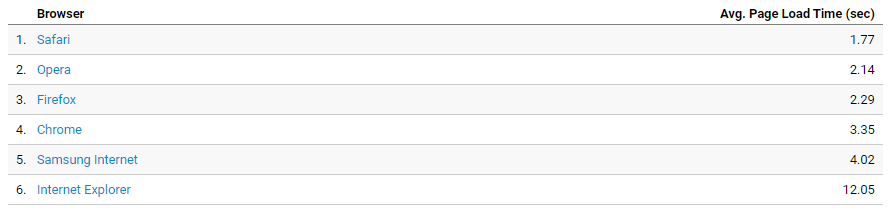
Is it still slow? We identified an issue that was potentially causing slowness in loading etc. and that has been resolved. The other question would be what browser are you using? Apparently IE is shite with the site: In any case, you can use the IPS theme is that is better for you so no worries.

-
I don't believe you need Punkbuster to play anymore.. at least when I re-installed COD4 the other day through steam I didn't have to install it.
-
The contents of that popup may be useful to understand..
-
Define: 'won't let me'. That implies that either an error message is coming up or a button is greyed out or a technical thing is happening.
-
OK I checked the first. Created a topic with an image. Then went back and edited the post, deleted the image and added a new one. Works fine for me so can you provide some more detail/screenshot perhaps showing the error so I can understand better. The editing timeout has been this way for a considerable length of time so unsure why it is only an issue now. Either way I see no real benefit of changing it.
-
Not all you mention is broken and therefore cannot be fixed. To answer your first question - simply it gets abused in many different ways and as such it is easier and more manageable to put a time limit on editing. To your second point, can you provide some more information. Are you talking about when you are editing that this happens or when you are creating a new topic/post/PM and have not yet created the content? Never-mind I re-read the post. I will have a look at that.
-
Although the error message isn't the greatest (I will update that). It is trying to tell you that you have entered an incorrect auth key and need to update it. Same as before the auth key is in the portal under 'Demo Manager' -> 'Demo Client'. Simply open the demo manager on your PC, click 'Help' -> 'Auth Key' and enter the correct key. As for access to all demos - speak to the head admins to see what they would like, if that's fine then I can make the change. Permissions are easily changeable. Before it was a quick no-authentication/authorisation app that was thrown together, then evolved to have authentication, now finally evolved to have both.
-
The dark themes in general seem to require more processing power on the client side as they are doing weird gradients and other styling. It sounds like some of the recent changes may have increased that usage. In through a website should not 'slow your system down' and once loaded only features such as the chatbox keep making requests which is a small overhead. The theme features should be fine if you have a half decent computer. Either way switching to one of the less customised themes will reduce resource usage.
-
@E-raser - no worries and thanks
-
I didn't clock this part before. The ordering on the client is done by the specific component so although it can be extended it's probably not worth the effort. I have changed the server side so it returns the demos to the client in date time order (newest at the top). That should help with what you want.
-
Sorry yeah didn't spot that. I have added a fix, next time you run the demo manager it should prompt you to update. Thanks
-
Awesome thanks for confirming ?
-
@E-raser - Can you have a look now if it works? I have removed the extension from all of the names.
-
Yes there were no permissions on there previously..
-
Looks like the 'testers' never actually tries running a demo! I will take a look at this but yeah looks like there is an issue with the name containing the extension. Duc
-
Yeah moderator and admin permissions are fairly different. Up to the head admins how they want that aspect to work.
-
Admins see everything for their game type. non-admins only see what they have added.
-
That it is a map?.. it's just colour coding, if we are talking about the map timeline?
-
Have you ever uploaded a demo?