
PainKiller
-
Posts
2039 -
Joined
-
Last visited
-
Days Won
14 -
Donations
0.00 USD -
Points
2,634,390 [ Donate ]
Content Type
Profiles
Forums
Gallery
Twitch
Running Commentary
Events
Store
Downloads
Everything posted by PainKiller
-

Missing Key - Windows 10
PainKiller replied to PainKiller's topic in Call of Duty 2's Call Of Duty 2 Discussion
That was my first port of call. Sadly I have tried everything and I've decided just to buy a new copy of the game. It's not overly important that I can't play it. I'm sure the server will survive without me for a bit -
Firstly, fuck Windows 10 for doing this. Secondly, you don't have to put up with me for a while! So, finally got to upgrading to Windows 10 and I really do enjoy it and it's nice and all BUT after reinstalling my steam library from a back up I can't play mutliplayer on CoD2. This is because it didn't actually give me my CD key. It's gone! I have tried these: Looking in RegEdit, nothing. Installing Windows 7 on my other HDD and also CoD2 and that was the same, no Key at all. Also verified the games cache, also nothing. It's a right old pain in the ass. For sure. If anyone else has anymore tips then that would be greatly appreciated! It might just be me having to get another key
-
I'll be down for it, given that I am not busy that weekend but I am thinking I am free.
-
mw2 freeze tag 2
PainKiller replied to dadda2's topic in Call of Duty 4's Call of Duty 4 Map Rotations
Thanks i just wasn't sure is all I've almost done that a few times good work -
mw2 freeze tag 2
PainKiller replied to dadda2's topic in Call of Duty 4's Call of Duty 4 Map Rotations
is that a typo? That might be hanging up the server and messing it up. Or there is a map there incompatible with FT and forcing TDM instead -
I think it is but the maps are broken into FF files and .arena files, it's still something I am learning with Loader and I've made my fair share of slip ups and editing has been needed. Even though the system may seem rudimentary it still works. Which reminds me, Loader has been having trouble getting into the redirect so we can't sort out maps and rotations - have you had any issues?
-
oh okay that's an interesting point. I'll look at seeing what I can do when throwing together the new TDM rotation for Cod2. Which I have more time to do now I've broken my arm
-
It's always good practice to test rotations making sure maps don't crash but this error is a file conflict so, the file the server is trying to read as its own is already being used by another. Say I had the same map on TDM and DM, I would have to keep deleting the map if I wanted to play on the other server because the server will read it, go "wtf this isn't mine" and lose its shit if there was an issue such as a typo in the rotation the server will crash and need rebooting. If the map is on the server and not in rotation then it goes right over it. For example over in CoD2 we have a map called Tobruk. in the rotation it's mp_tobruk. If I typed that wrong in the rotation like mp_tbruk it would crash. If I didn't include the map in the rotation at all it would skip the map as it does now.
-
You've got conflicting or corrupted .iwd files. It happens every now and then if two servers are running the same custom map because the server does not know what to read. Delete the file and try again. Any time you get an invalid .iwd file follow the path and delete it.
-
Thank you everyone for the birthday wishes, I had a great day and it was a lot of fun! I'll be sure to pop in so you all have a good shot at knifing me, bashing me or shooting me
-
Hey I can be there for this one!! I'm off work next week and don't have to be up at 4am GMT!
-
FU window, happy birthday you old fart. I'll try make sure I am in TDM more today so I can give you a belated bash
-
CTF Thursday 7/11/2019 5pm - ?
PainKiller replied to loaderXI's topic in Call of Duty 2's Call Of Duty 2 Discussion
I can't do thursday sadly. I'll be in bed because I gotta be up at 4am every morning for work and when this rolls up it'll be 10pm here lol I can do fridays or saturdays -
You said "soccer".. you too, Rob, are becoming American. We're all doomed!
-
You need to get yourself a capture card or recording software, much better than what you're using
-
I popped in real quick last night to grab the mod and I'll see if I can get on some time soon when some more people are in, would love to make this a weekly thing, perhaps friday or saturdays
-
All sorted now in terms of clearing out the folder, got a back up too but hopefully it's sorted. I'll still kick your ass though
-
okay found where my custom stuff is stored, and my profiles and I did a bit of a clear out, I'll try connecting again later
-
Is there anywhere I can see my config files? I wanted to back up my profiles and what not before I start playing around in my config's because there might be something in there. I play around with my CoD2 configs to fix things so might be able to do the same with WaW but I can't find them
-
I don't have any other maps I don't think. The other servers I go on only have stock rotations and maybe one or two custom maps, the DM server is the only one that has custom stuff so I don't think it is that I have too many maps or something. However I am not going to dismiss that idea, I will take a look!
-
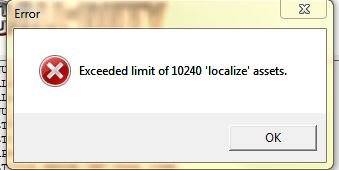
More often than not when I connect to the WaW DM server I get a game crash and an error message; the one below. Is there any way to fix this? I wanted to shoot @LtLaszlo but sadly I can't

-
Y'know, I could just edit the scripts on CoD2 and have all trips and mines anti-spart mines. They only blow off your stubby little legs
-
Tubes, bunny hopping, wall spamming and RC's have bought this community together into one loving family.. oh who am I kidding, FU @Unchileno
-
Quick! I'm annoyed with someones play style, I am going to whinge on the internet, nothing bad EVER comes from that! just let it go man, everyone has their own styles. We have campers, naders, tripwire placers and run and gunning bunny hoppers on CoD2, we still manage to blow each other the fuck up. It's just about adapting. If someone is bunny hopping then shoot a little higher, they'll jump to catch your bullets. It also slows them down so there is also that. My only tactic to survive is under fire, I feel oppressed! I guess its time to take out my space bar then I might not do it as much.