Search the Community
Showing results for tags 'COD4'.
-
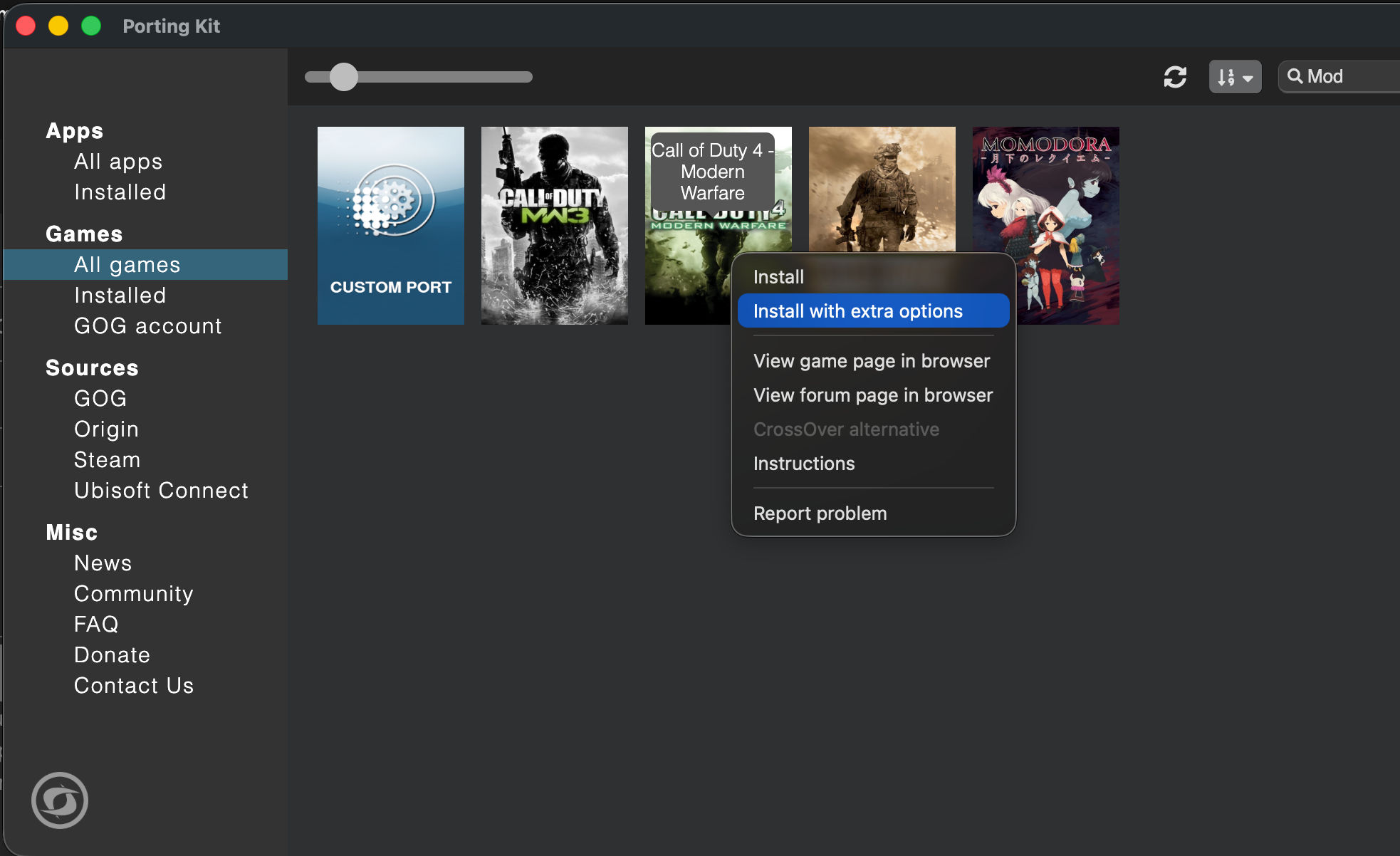
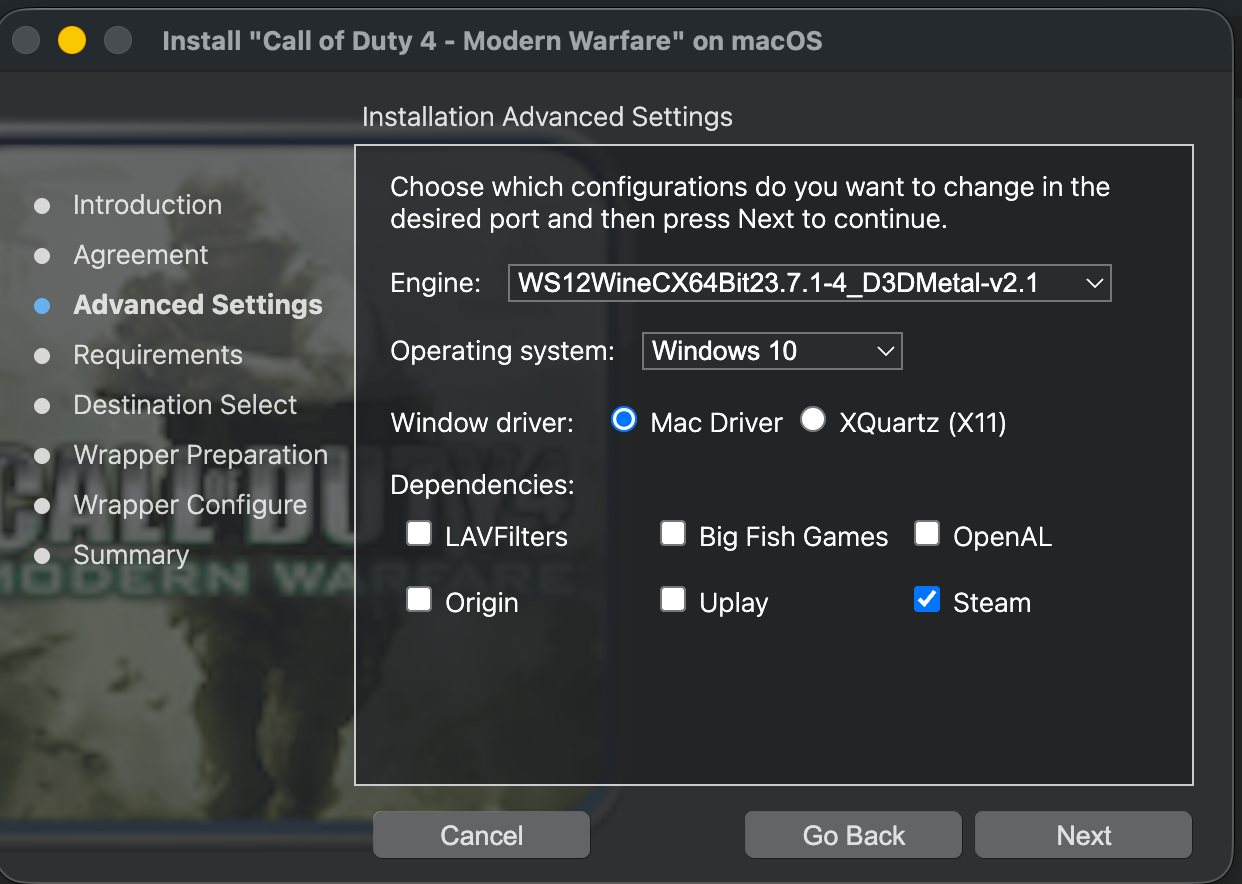
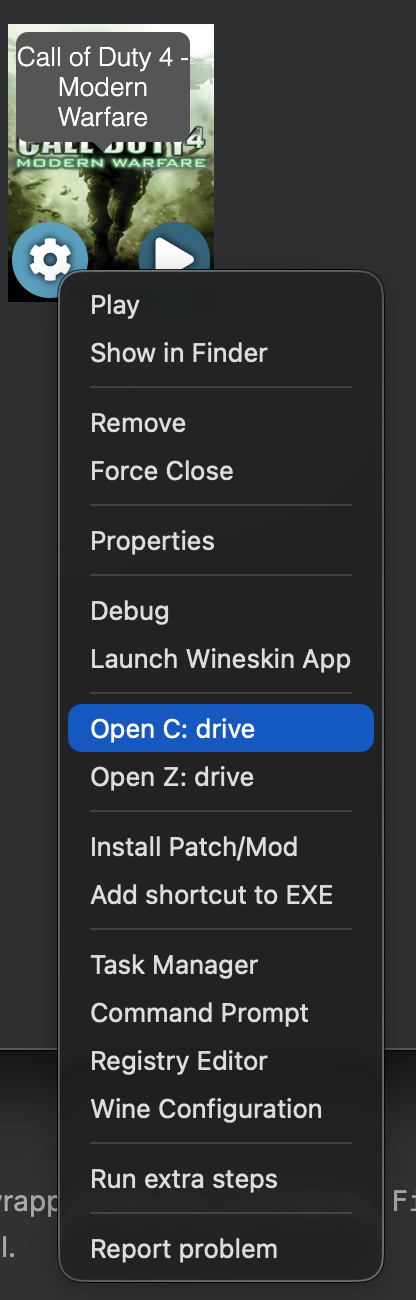
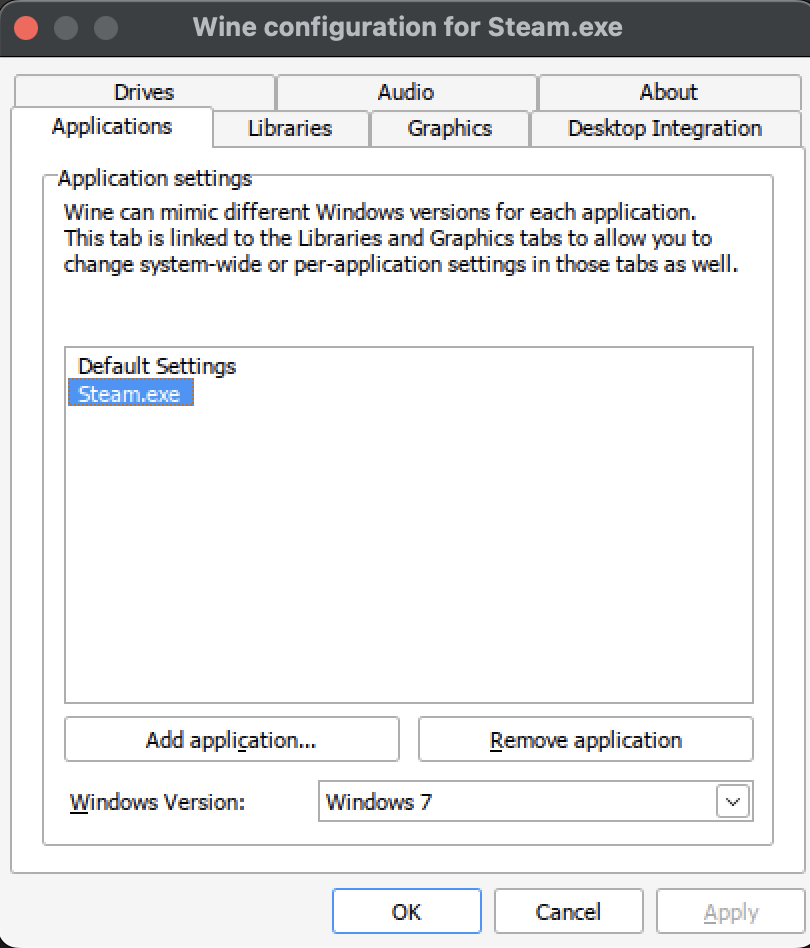
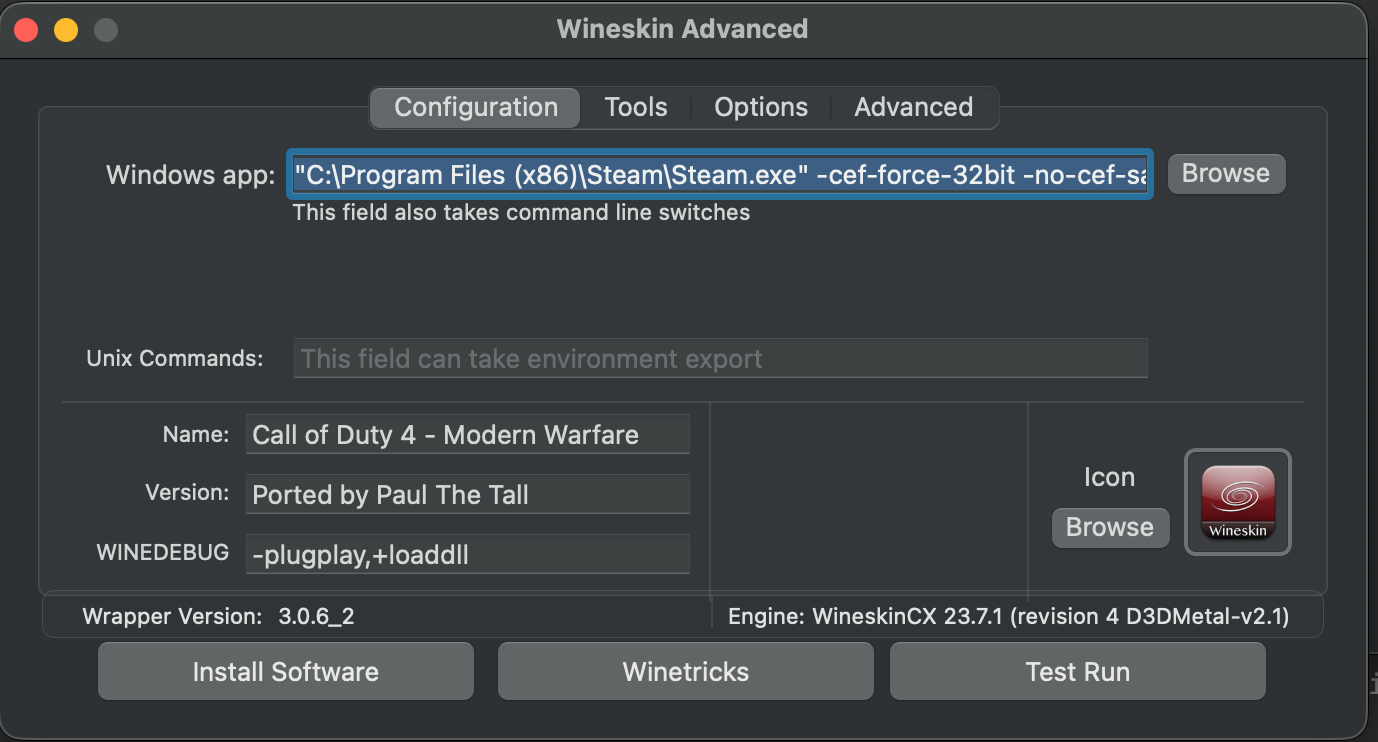
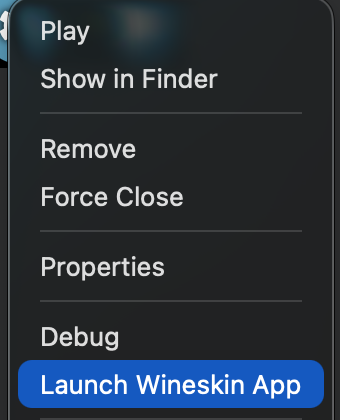
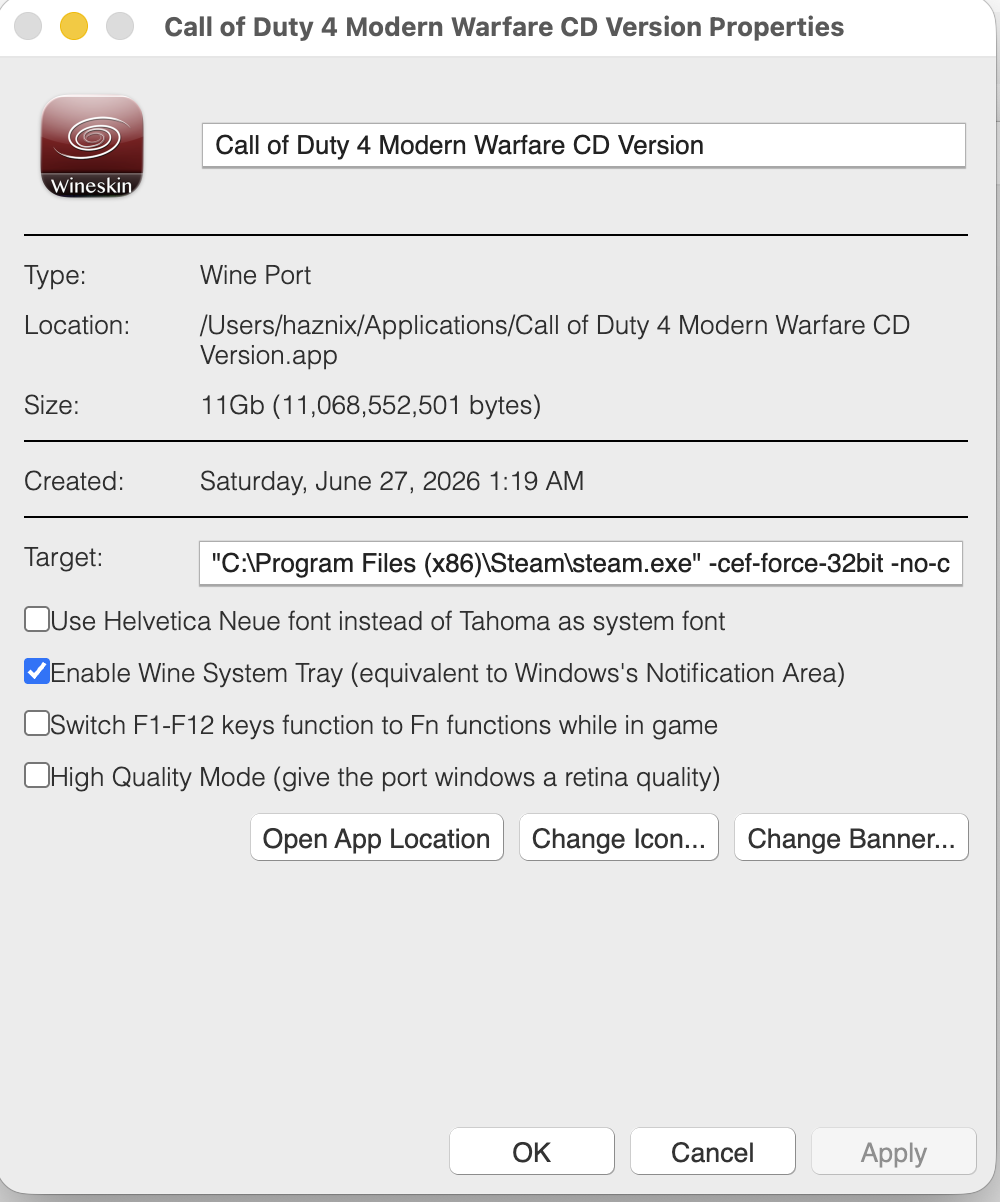
 Call of Duty 4 + CoD4x on Apple Silicon using Porting Kit I spent a good 3 days sorting this out for the most optimal combination. There are a few different ways you can play this aging game on Apple Silicon. It becomes challenging given that Apple has discontinued 32-bit app support. What I have here is a fully tested setup for playing Call of Duty 4 - Modern Warfare with the CoD4x client on Apple Silicon with up to 125+ FPS. This works for both CD/retail owners and Steam owners. The base-game install differs slightly between the two, but everything from the CoD4x client onward is identical. I used AI to create the steps following my experiments and then I revised the notes. Tested on: M2 Pro/M5 Max, macOS (Tahoe), Porting Kit + WineskinCX64 23.7.1 (revision 4, D3DMetal-v2.1). TL;DR : why this is finicky and what to do Three separate problems get tangled together: Graphics engine. COD4 MW is a 32-bit Direct3D 9 game. The engine you pick has to accelerate D3D9 specifically. D3DMetal does. DXMT and DXVK/d9vk do not. Steam has to be running for servers that have Steam auth enabled, applies to CD version of the game too. Steam's webhelper crashes with HW acceleration D3DMetal on Apple Silicon when run with Win 10 compatibility, set it to Windows 7 in Wine Config Utility under Applications tab. Performance is CPU-bound. A 2007 game can't tax an M-series GPU. The limiter is the translation layer on the CPU, and Steam sitting on the performance cores steals your frames. This can be addressed by demoting Steam to the efficiency cores. Part 1 — Build a CLEAN wrapper In Porting Kit, select the stock Call of Duty 4 port, then Install with extra options. For the engine, choose the CX64Bit D3DMetal option (it will show as WineskinCX 23.7.1 D3DMetal-v2.1, see picture below). Set the wrapper's Windows version to Windows 10 at creation. This is the version the game will run under, and it's fine for the game. Select Mac Driver and Steam in dependencies Part 2 — Install the base game & Steam CD / retail owners: Install from the disc by mounting an ISO, then right click on Setup.exe and choose Open With Porting Kit. OR Copy your existing game files into the wrapper's drive_c/Program Files (x86)/Activision/Call of Duty 4 - Modern Warfare/). Apply the official 1.7 patch if your copy isn't already at that level. Steam owners: Since we selected a D3DMetal engine Steam will not automatically install due to inherent incompatibility. Download Steam for Windows from their website. Then right click on the exe in your macOS Finder window and select Open With "Porting Kit". This will install Steam, and try to run it and most likely will result in a crash, look at Step 3 for more details. Install COD4 MW through Steam into this wrapper once you've followed the procedure in Step 3. Part 3 — Install Steam into the SAME wrapper Steam must live in the same wrapper/prefix as iw3mp.exe. A separate Steam bottle will not authenticate the game. 3a. Set the Windows version BEFORE first login Use a per-application override so you can make Steam happy without disturbing the game: Open winecfg → Applications tab → Add application → select steam.exe. With steam.exe selected, set its Windows version to Windows 7. 3b. Add the CEF launch flags (this stops the webhelper crash) The webhelper crash on Apple Silicon is a known 64-bit CEF bug under Wine. Steam's own "disable hardware acceleration" toggle does not fix it. Forcing the 32-bit webhelper does. Set Steam's launch arguments to: -cef-force-32bit -no-cef-sandbox -cef-single-process -cef-in-process-gpu -cef-disable-d3d11 -cef-disable-breakpad -nofriendsui -nofasthtml (In Porting Kit/CrossOver, set these as the arguments on the Steam launcher) 3c. Quiet Steam down In Steam settings, once logged in: Interface / Downloads: turn off "allow downloads during gameplay" and automatic game updates. Cloud: disable Steam Cloud. In Game: disable the Steam Overlay (it hooks the game's frame-present call and adds per-frame overhead under D3DMetal — a classic stutter source). Low Performance Mode: enable it. With the 32-bit webhelper forced, leaving web-view GPU acceleration on plus Low Performance Mode was stable in testing and reduced overhead. If you still get instability, try turning web-view GPU acceleration off — it's the one knob to flip if the webhelper is still unhappy. Part 4 — The performance unlock: demote Steam to the efficiency cores This is what takes you from a jittery 40–120 to a solid 125+FPS. Why: the game is CPU/translation-bound, so any process competing for CPU steals frames directly — that's why FPS dips even when you're staring at a wall (the wall is trivial for the GPU; the dip is Steam spiking on the CPU). macOS doesn't let you hard-pin processes to cores, but it does place work on P-cores vs E-cores by QoS class. Demote Steam's webhelper to background QoS and the scheduler parks it on the E-cores, freeing the P-cores for the game. The tool is taskpolicy. Do it after Steam is up and logged in. The script below watches for the webhelper processes and demotes them automatically (they spawn several and can respawn, so a one-shot command misses some). Important: it targets only steamwebhelper. It does not touch steam.exe, iw3mp.exe, or the shared wineserver — throttling the wineserver would slow the game too, since they share it. The watcher script Save as cod4-steam-qos.sh: #!/bin/bash # # cod4-steam-qos.sh # Keeps Steam's webhelper processes demoted to background QoS so the # macOS scheduler parks them on the efficiency (E) cores, leaving the # performance (P) cores free for the game (iw3mp.exe under D3DMetal). # # Only targets processes whose command line contains "steamwebhelper". # Does NOT touch steam.exe, iw3mp.exe, or the shared wineserver. # # Usage: # 1. Launch Steam (through your Wine wrapper) and let it log in. # 2. In Terminal: sudo bash cod4-steam-qos.sh # 3. Leave it running while you play. Ctrl-C to stop. set -u PATTERN="steamwebhelper" # matched against the FULL command line INTERVAL=5 # seconds between re-scans if [ "$(id -u)" -ne 0 ]; then echo "Please run with sudo: sudo $0" >&2 exit 1 fi seen=" " count=0 cleanup() { echo echo "[cod4-qos] stopped. Demoted processes stay on the E-cores until Steam restarts." exit 0 } trap cleanup INT TERM echo "[cod4-qos] watching for '$PATTERN' every ${INTERVAL}s (Ctrl-C to stop)…" while true; do # -i = case-insensitive, -f = match the full argument list. # Wine names each process after its loader, so the real .exe name only # appears in the arguments — -f is what makes this match at all. for pid in $(pgrep -if "$PATTERN"); do taskpolicy -b -p "$pid" 2>/dev/null # idempotent; safe to re-apply case "$seen" in *" $pid "*) : ;; *) seen="$seen$pid " count=$((count + 1)) echo "[cod4-qos] demoted PID $pid (total this session: $count)" ;; esac done sleep "$INTERVAL" done Run it (in the normal macOS Terminal: sudo bash cod4-steam-qos.sh Confirm it's working in Activity Monitor → Window → CPU History — you'll see Steam's load move onto the E-cores. PIDs reset each session, so run the script each time you play (or adapt it into a launch agent if you want it permanent). Runs under sudo so taskpolicy never stops to ask for a password mid-loop. Part 5 — In-game settings Resolution: native/fit-to-screen is fine — you're not GPU-bound, so resolution barely moves the needle. If you're on a Retina wrapper, check the Retina Mode toggle; with it on, your chosen resolution may actually render at 2× (4× the pixels) under the hood. This will be in Properties for the port, keep it unchecked. Framerate cap: CoD4 is idTech3, so com_maxfps is tied to jump physics. The canonical competitive values are 125 and 250. Open console (~) and set: /com_maxfps 125 /cg_drawfps 1 A cap you can hold steadily feels far better than a higher one that swings, because input and jump physics are framerate-linked. If you can't sustain 125 with Steam running, lock to a value you can. Part 6 — Play session order of operations Launch Steam through the wrapper (Win7 per-app override + CEF flags). Let it log in. Minimize it. Run the QoS script: sudo bash cod4-steam-qos.sh. Launch the game. You can launch through Steam, or launch iw3mp.exe directly with Steam idling in the background — the auth server only needs Steam alive, not the launcher path. Connect to your Steam-auth CoD4x server. Do not close Steam. The server re-validates continuously via Steamworks; kill Steam and you get dropped. Minimized + demoted is the sweet spot: present enough to auth, quiet enough to stay off your frame budget. Troubleshooting FPS is low / stuck at the non-accelerated level. Confirm the QoS demotion actually ran (CPU History window). FPS swings wildly while staring at a wall. That's Steam spiking on the P-cores. Run the QoS script; disable the overlay and background downloads. Steam crashes on launch. Make sure the CEF flags are actually applied, set steam.exe to Win7 per-app, and verify you didn't change the Windows version after installing Steam. Steam worked, then broke after "Updating Steam". A version/OS change re-bootstrapped it. Relaunch with flags; if needed, rebuild the Steam side and don't touch the OS version afterward. Graphics look wrong / glitchy. You almost certainly have leftover DXVK/d9vk overrides from a different engine, create a new wrapper. Can't join auth servers. Steam must be running, logged in, and in the same wrapper as the game. Installing COD4: /connect 74.91.116.93:28960, it will auto install COD4x client for you upon connect. Trust the process. Why not DXMT, DXVK, or a Parallels VM? DXMT translates D3D10/11 only — it does nothing for a D3D9 game, so CoD4 falls back to the slow path. DXVK/d9vk on Mac is D3D9 → Vulkan → MoltenVK → Metal (extra layers), and its D3D9 component is deprecated. Slower than D3DMetal here, and it fights D3DMetal for the D3D9 path. Parallels + Linux guest — no true GPU acceleration and you'd stack even more translation. Skip. Parallels + Windows 11 ARM guest — actually viable (real Windows, real Steam, x86 emulation via Prism, Parallels' virtual GPU) and avoids the whole Wine/webhelper mess, but the virtual GPU caps framerate well below native D3DMetal. Good fallback if you don't want to tune; not the high-FPS path. Credits CoD4x team — client and docs (github.com/callofduty4x/cod4x-docs) NovaVeterans — Mac/CrossOver CoD4x walkthrough CodeWeavers community — the -cef-force-32bit webhelper fix Everyone in the macgaming / CoD4x community who documented pieces of this If this helped, drop your chip model + FPS results below so we can build a compatibility list. Please tag whomever does mac gaming. cc: @deadman @El_Terrible @YACCster
-
Hello Everyone, We have been working on some exciting changes to bring to our COD4 MW community. A little while ago we started recreating the currently deployed Freezetag mod so we can recover the source code. This would have allowed us to make enhancements and introduce new features on top of the currently deployed "xi_mw2_old" mod. Our end goal is to have a COD4x Server running our custom mod with COD4x support built in to it. This has several advantages, namely better network performance, stability, security and anti-cheat features. Here are the two tracks where we are working. 1. COD4x Server + xi_mw2_old (existing + some enhancements) 2. COD4x Server + COD4x enabled custom mod We were able to get support from our host (NFO) where they went above and beyond to support COD4x on a managed server. Therefore, we are able to start testing track #1. Here are the details for this server. 74.91.119.86:28960 On track #2 we have made great progress but it is a tall order. We had to reconstruct the mod from a deployed binary and it has been challenging to say the least. We are at 60% completion at the moment and it requires more hours. I will update this thread as I go, and feel free to provide feedback. @Ruggerxi @WldPenguin
- 46 replies
-
- 22
-

-

-

-
 What would be the best time to catch a game on COD4? AND World at War?
 -
I recently bought cod4 on pc (steam), and I can't seem to get into the MW2 freezetag server. It would say "key code in use. try reconnecting later". I tried many key codes. I can play on other servers that require keycodes, but not this one. Any sort of help i can have?
-
 Obviously, my favorite player is @FRENCHI because of his lovely French accent when giving information and saying jokes in English in game And, of course, being French, he is a very good player! PS: thanks to @SweeperMan for the idea and sorry for having stolen your post! (Hope it won't bother you )
 -
ignoreignoreignoreignoreignoreignoreignoreignoreignoreignoreignoreignoreignoreignoreignoreignoreignoreignoreignoreignoreignoreignoreignoreignoreignoreignoreignoreignoreignoreignoreignoreignoreignoreignoreignoreignoreignoreignoreignoreignoreignoreignoreignoreignoreignoreignoreignoreignoreignoreignoreignoreignoreignoreignoreignoreignoreignoreignoreignoreignoreignoreignoreignoreignoreignoreignoreignoreignoreignoreignoreignoreignore
-
I would like to host a ftg tournament of sorts, 1 match of ftg with: 1 round of crouched knifing, 1 round of prone knifing only, 1 round of bolt action sniper rifles no scope, 1 round of shottys, and 1 round of pistols only, tie breaker round: noobs tubes and knifes. prizes: winning team can choose from these games some may be region locked if they are I'll give you another , noobiest player gets a humble bundle monthly pack for October. In the link below you can see the list there is over 100 https://docs.google.com/document/d/1JK5Bpno5vsnV381O6rB7aQT0_pUPPm3YpQMT5Zmx-O0/edit# Please reply if interested
- 1 reply
-
- 3
-
-

-
- noob
- noobs4life
- (and 3 more)
-
Hello, before on my server I ran an original mod where to make tactics have a cfg with configs disabled type, rpg, deadsilencio, racker etc ... Now I put this mod ow2 v145f_2 and I do not cosigo disable some things in the perks. Does anyone know how to do this?
-
Hey you... Yeah you.. Got your Funderwear on? Looking for a diverse Gaming Commmunity? Tired of gaming alone or with people that wear their undies to tight? Xtreme Idiots is here for you! Oh yeah baby.. We got you covered like mud on the tires of your Jeep Willy. What I offer? You know you want to know more.. Sorta like that moment when you're asked what the hell we do all day? WE GAME!! My Care Package includes.. 1) I'm Canadian... Who doesn't love Canadians we got that maple syrup and bacon that makes you wanting to know me more.. 2) I'm 31 years of age.. Sorta like them tires on that Jeep Willy. 3) I'm very open and honest and have a great personality and am easy to get along with.. Unlike them tight undies. 4) I have teamspeak, discord, just about anything your heart desires for communication needs. 5) What do I do? I drive a limousine a 30FT Ford Excursion blacked out with no mud on them tires.. (Just snow and ice) 6) What else do I do? I build and theme websites for Invision Power Boards and HTML websites. I also am sponsored by a hosting company (CLASSIFIED HIGH LEVEL ACCESS REQUIRED). 7) I'm am a FPS gamer I shoot things that move... Just ask Hammer well he will say I die frequently but that's cause he is a "Noob Tuber". 8 ) Highly designed PC gaming rig that is built with military precision like that Jeep willy.. 9) I'm a DAD. 10) I originally started hanging around with XI back in 2014 but due to personal life issues and the job I had then (Tow Truck Operator) time for gaming was limited and spent alot of time working. I did check in frequently didn't post but jumped into the COD4 Freeze Tag server and kept in touch with a few people. HIGHLY CLASSIFIED CONTACT INFO: 1) STEAM: http://steamcommunity.com/id/ucjohn/ 2) TWITCH: https://www.twitch.tv/ucjohn 3) DISCORD: UCJOHN™#3338 4) ORIGIN: UCJOHN 5) UPLAY: UCJOHN Sincerely, UCJOHN
-
Need some help. My PC restarts randomly when I am playing COD4. Some background is that I had AMD 7870HD and switched it out with GTX 1080 TI. Thats when I started noticing that my system would restart once in 30 mins in COD4. I attributed that to legacy drivers from AMD or some crap in registry. I did a clean install of windows last week (formatted the drive) and now I have a restart in COD for once in 5-10 mins. Not sure what the issue is. I am not overclocking, CPU or GPU. They are running in stock config. CPU is on liquid cooling and case has 4 fans so plenty of cooling. GPU is Asus strix 1080TI (has 3 fans) so shouldnt be heating up. I am running memory on XMP so there is some overclocking there but I tried disabling XMP but no change. Power-wise, I have a single GPU system with one NVME drive (Samsung 960PRO) and two HDDs 2TB each. My PSU is Corsair HX850 so should be ample power. Another data point is that I have run GPU stress test FurMark and no restarts. I also tried playing Battlefield 4 (1 hr+) and no restart. Max GPU temp seen was 68C. The restart only happens in COD4. I have attached a snapshot of HWMonitor outpu Any advice on how to debug this issue? HWMonitor.txt Below is the HWMonitor readings after 1 Hr of BF4 HWMonitor_BF4.txt
-
Make it so you can remote thaw a teammate in view while you are being thawed. Could be chained through multiple frozen teammates. Just an idea...
-
Hi again XI have fun in your mods
-
 Evenbalance no longer supports Call of Duty 4. This does not mean we will be removing Punkbuster - it is still a viable admin tool which provides us with many methods of protecting our servers. It does mean that if you reinstall then the standard PBSetup will be unable to download and setup the files for you. I have therefore added a legacy section to our downloads that will help you setup Punkbuster. There is now an updated walk-through found here: http://www.xtremeidiots.com/page/public/bible/_/xi-website/punkbuster-installation-for-call-of-duty-r24
 -
Version windows/linux 32/64
6890 downloads
PBSetup for legacy games Video Walkthrough: AA2, BF1942, Call of Duty (all formerly pb supported Versions), cysis, cysis wars, D3, ET, FFOW, FC2, q3, Q4, ETQW, MoHA, NfSPS, Prey, RtCW, RSR6, RSV, RSV2, SoF2, Wolf, Warock This is a workaround to install the latest punkbuster update released for games with discontinued PunkBuster support using the original tools and update resources released by http://www.evenbalance.com 2002-2011. For Linux skip to footnote. HowTo: Extract the archive to any folder, change directory to the new folder (double-click Posted Imagepbsetup+legacy) From there run pbsetup. Add the legacy game and the proper Game_Path (not! /pb), that is: where the Game.exe is. To check the Game_Path just ALT+Return the Windows-Shortcut to the Game [copy+paste the 2nd line's "Execute in:" Value]. Then run menu item 'check for updates' and pbsetup will download the latest pb-update (*) to the proper /pb location(s). See also: HowTo.gif Limitations: pbsetup will download a new pbgame.htm without legacy games each time when it is run. Thus it is recommended to unpack the archive again from scratch if needed. Disclaimer: This is a workaround to install the latest punkbuster update released for games with discontinued punkbuster support using the original tools and update resources released by http://www.evenbalance.com2002-2011. No fixes, updates or support will be delivered, this workaround is delivered as is. (*) No warranty is given if or how long the download resources used to pb-update the listed games will stay available online. this information can be found in Readme.txt _____________ Note for Linux: Both archives include pbsetup.run and pbsetup64.run , For further information please refer to the information center article : http://www.pbbans.com/info-center-pbsetup.html#usingpbsetupcon - soz this HowTo was focused at windows lusers -
- 1 review
-
- 1
-

-
Hi there, I've been trying to get into the XI servers I have saved in my favourites, and none of them have been showing "ping" since yesterday.....I'm not computer friendly and hoping someone may have a suggestion for me...refreshing doesn't help, I can't find XI servers when I look under the Internet as a source.........I can see there are presently 30 people in the server from the website, but my favourites does not refresh to show that. Any suggestions? Thank you for your time....Shadow
-
Been playing COD4 freezetag for a few years now ( 700+ hours according to Steam ), primarily on XI but sometimes F4H or ESC if XI is full. For those who don't know the origin of my name, this will catch you up: ( click image for video ) I play other games as "Noumenon"
- 5 replies
-
- 1
-
-
- introduction
- freezetag
- (and 1 more)
-
Hello XI sorry admin i try add in download section dont work I'm glad to share you good news for CoD4 MODs community Big thanks to HUGO to spend his time creating this map So dear Admins of modded servers, great news for you all thanks again Hugo http://www.mediafire.com/download/i192t0vobpl3uvf/mp_cgc_crossfire_V1.4+.rar PS:sorry for bad english
-
Hi guys, my name is The Famous One and probably all of you will already know me of course I'm a 21 year old guy living in Leuven, Belgium. I'm not a terrorist, not a beer brewer and not a chocolatier! Just a regular guy studying Industrial Engineering who has been enjoying all Xtreme Idiots since 2011 I think. You can find me on the COD4 Freezetag MW2 server, and sometimes I play the zombie server and the deathrun server! All of you have a great day, see you in game! The Famous One
- 31 replies
-
- 4
-
-
- The Famous One
- Introductory post
- (and 2 more)
-
 Hi folks. I have a problem running COD4 in MP. It runs in single player okay but when I try and start a MP game it quits and I get the error "iw3mp.exe has stopped". I have tried reinstalling Steam and COD4 and installed the PB update mentioned elsewhere. Any Ideas?
 -
Good day friends, I'd like to give a shout out to Loader for his help installing my game on my new rig. It's been a long and tiresome task getting this thing up and running, as I had to return the first main board I purchased. I finally got it assembled with a new working main board and excited to see the improvements in battle on line. Loader is the "MAN"! He has been through a lot lately with the passing of his mom and is still not through the fall out of that loss. I am very thankful to be a part of such a giving community and also to have found so many great personalities. Thanks again Loader, much love buddy.
-
Hey everyone I recently came into an issue. I play on the Cod4 MW2 Freezetag server and I have played a lot. I would like to say I'm pretty well known there. But recently out of nowhere I'm getting kicked with an error I can not seem to fix. The error states: Kicked for 0 minutes. Punkbuster corrupted File/Memory [81353] I have done the basics... reboot... reinstall... re download and replace.... blah blah... I googled it but no avail If Anyone can help me with this issue it would be very grateful because I am completely lost. Thanks!
-
Hi, I have a new pc on the way with no OS installed as of yet, I want to back-up my games so that I don't have to sit and wait for all the maps to download. I'm currently running Windows 7 Pro. Are there any specific folders I can copy and then just copy over once I have installed the game on the new machine? I know my config file might need tweaking as the new machine is different specs (or does this not matter), or i can just copy my binds portion. Also I have origin and steam , can i copy my game contents or do i have to download the huge 80 odd gb of Battlefield 4 all over again? ONE MORE QUESTION Should I stick with Windows 7 Pro or upgrade (?) to 8 Pro? cheers Elbow
-
Version 0.58
79 downloads
Tool for easy playing demos of game Call of Duty 4: Modern Warfare. You can use slowmotion, faster playing, freezing demo, toggle third person view, toggle view HUD info and some keys for cheathunters. Installation and run: 1. Download file cod4player.zip (227 kB, cod4player.exe + readme.txt). 2. Just unzip file "cod4player.exe", but rather don't put it into the COD4 folder. Then simply run it. Controls: * In main screen click on the keybord to show info about controls. * You can set association demos in Setup menu and then just click on demofile to playback. Restrictions: - If You have CoD4 just as copy on HD (no info in registry), cod4player ask You for path to iw3mp.exe. - Windows Vista: When get this error "Permission denied", run cod4player as Administrator (right mouse on cod4player ad select from menu Run as..) -
Hello, Everyone Just figured I had gone MIA from gaming on the XI COD4 servers. I miss gaming with everyone some might still recall who I am. Gamed with Devildog and a few others, was good times. I'm 28 I live in Manitoba, Canada I drive Limousines I go between the 2 Black n White Ford Excursion 26" Feet long fun stuff driving around here. I also do alot of assisting with people fix game server issues or teamspeak issues or generaly PC hardware & computer tech support. I rock out with my Shotgun out in Battlefield 4 that's how I roll with my 870 CMS. My other half and I had our first child on May 8th/2014 8lbs 8oz 21 1/2" long he eats, n sleeps more then me but he is growing fast now... YIKES well he is a future gamer hoping FPS lol Anyways hopefully will get back into the swing of things and maybe get asked to join XI again. I'll be around alot more. Thanks, ucjohn
- 16 replies
-
- 2
-
-
- ucjohn
- battlefield
- (and 8 more)